Don’t forget to turn of the debugger when doing performance testing

Recently our dotless lead tester Gert discovered a little bug in the dotless minifier that made the minifier “loose” css expressions that where not followed by a semicolon.

The fix to this was in theory quite simple, simply treat all closing braces } as semicolons so expressions are still terminated. Doing so then led to one new cause for problems: ; }.

Semicolons followed by a closing brace call the ExpressionBuilder with a empty value, the ExpressionBuilder can now either throw an exception or return null. I decided to try throwing exceptions first.

Returning null somehow felt less elegant and I did not consider the performance impact of throwing an exception. So after implementing I decided to test this and wrote a little benchmark console program to test my theories.

In Shock I watched the exception case to be 10 times slower than simply doing a null check. Hastily I reverted the exception check and started implementing the null-check in the dotless code when I remembered the debugger.

Doh! How could I run a performance test with the debugger attached. Ran the program without the debugger: exceptions where only twice as slow as the null check. Not too bad, but still not fast enough for dotless.

So, here some wisdom: Always make sure you run without the debugger when testing performance. Exceptions while debugging are roughly 10 times more expensive than without debugger.

Read more →

Thanks Lijit!

You may have seen that I use Lijit to power the on-site search for my blog. Since Lijit by default uses a Google custom search to power this (nothing really wrong with that) I became quite unhappy with the results (Google for some reason doesn’t like to index articles but rather indexes categories :(). Since I didn’t find my own stuff through Google, getting the same bad results through Lijit was quite annoying.

So I tweeted this one day:

image

Well, took about 45 minutes to receive this:

image

And this very nice Email alongside:

image

Well, that was 2 days ago. Search results that I get when using the on-site search are back to what I expect them to be and I’m once again able to find my own stuff.

Thanks Lijit. Great service!

Read more →

Removing .svn folders with Powershell

I needed one simple thing: Delete all .svn folders from a repository so I can send it to my customer. While searching most of the results I got where either wrong, or completely besides the point, so I decided it may be worth sharing:

get-childitem -Include .svn -Recurse -force | Remove-Item -Force –Recurse

Read more →

Pandora used in dotless and moved to GitHub

Pandora, my personal IoC Container (mostly written for educational purposes) has recently been integrated into dotless. This has helped us improve the design of dotless without having to take on a big dependency like Windsor or StructureMap.

I chose to implement Pandora through the Common Service Locator interface by Microsoft, so if we ever feel restricted by Pandora we can easily switch to a more potent container without touching the actual dotless code.

This step also made me bring the Pandora repository from mercurial to git with some help from Horst. He was kind enough to run hg-fast-import for me.

Pandora can now be found on GitHub with a similar build process as dotless and elms-connector.

Pandora on GitHub

Read more →

Writing ELMAH Exceptions to Log4Net

Yesterday a friend asked me if I know how to make ELMAH write exceptions to a Log4Net appender.
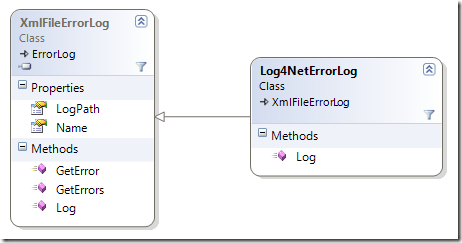
My first idea was to write a custom ErrorLog that would do that, but that’s not really possible since ELMAH must be able to retrieve errors after the fact so they can be displayed in ELMAH’s web interface.

Well, turns out it’s even simpler and more obvious by simply subclassing an existing ErrorLog and hook into the Log method:

image

Assuming you use the XmlFileErrorLog (you can use this method with all of them) you simply subclass it and put your call to Log4Net before the base.Log call:

public class Log4NetErrorLog : XmlFileErrorLog
{
    public Log4NetErrorLog(IDictionary config) : base(config)
    {
    }

    public Log4NetErrorLog(string logPath) : base(logPath)     {     }

    readonly ILog log = LogManager.GetLogger("bla");     public override string Log(Error error)     {         //Write whatever you want to Log4Net         log.Fatal("Exception logged through ELMAH: " + error.Message, error.Exception);         return base.Log(error);     } }

Now the only thing you have to do is change the errorLog line in your ELMAH configuration (found in web.config) to reference your new ErrorLog subclass:

<elmah>  
    <errorLog type="MyAssembly.Log4NetErrorLog, MyAssembly" logPath="~/App_Data" />  
</elmah>

It will still log to XML, but also generate one entry per log to Log4Net. If you don’t want to save anything you can simply subclass the MemoryErrorLog class and set it’s size to 1.

Read more →

The joy of working with dotless

Ok, I just spent some time on the imagineClub website adding our board’s bio page. The HTML is not really interesting, but since imagineClub was written while dotless was still in development I wrote the CSS the old fashioned way.

Since dotless has reached some maturity I’ve been dogfooding it on imagineClub to make use of the minifier and the caching, but never had any real LESS code in there.
When I had to fix something today I was so happy to be able to write CSS like this:

div#team
{
    width: 414px;
    p
    {
        float: right;
        width: 300px;
    }
    h2
    {
        clear: right;
        font-size: @title-fontsize - 4;
    }
    img
    {  
        width: 100px;
        margin-bottom: 4px;
    }
}

This is how CSS was supposed to be, and with dotless it has become just mindlessly easy to do..

Read more →

ELMS-Connector documentation available

I decided not to invest any work in writing docs for a tool only I am using, due to the fact that it quite rapidly outdates during active development.

Well, ELMS-Connector development is mostly finished and after getting an email by someone from Amsterdam asking how to use ELMS-Connector I decided to finally write the docs.

The documentation is in the GitHub repository alongside the code, but I also saved it as PDF and uploaded it.

It’s by no means perfect, but it should be enough to get anyone who wants to use ELMS-Connector up and running quite smoothly. Comments are always welcome.

Read more →

Wasted innovation: Google Wave

wavelogo[1]

It was pretty inevitable that Google Wave would fail after being hailed as the solution to all our problems. Still, looking at a defeat gives me a feeling of malicious joy.

Let’s start at the beginning: I got my invite almost 3 weeks ago, and after an initial: wow cool. I found out that nobody I care about had Wave.

After another week or so I finally got 20 invites to give out (if you want one send me an email, I’ve got 13 left) and finally managed to get the most important people I communicate to into Wave.

And, we had a lot of fun watching each other’s cursor spit out text live on the screen. Unfortunately, that was the only thing we found useful, and it was only funny for about 20 minutes. After that, we went back to our lives and that’s it. I’m still waiting for a reply to a Wave I sent Kristof almost 2 weeks ago.

So, what’s the problem? Wave technology is revolutionary, the idea is just not. It’s at heart:

Awesome technology looking for a problem to solve

Wave fails in most/all of it’s goals:

Replace Email: Ok, so Email is everywhere and it works (thanks to GMail). I get mails pushed to my Android phone, and all in all: It does everything I want flawlessly and most importantly: EVERYWHERE.
Wave on the other hand: Only inside my browser, no notification tool whatsoever. Pretty much equally useless as Facebook Messaging.

Replace Chat: Instant typing is funny, but using the tool for IM just does not cut it usability wise. Live and Skype are great at that too, and even ICQ had that instant typing thing going some versions back (nobody wanted it). Wave once again misses all the major points here: No mobile client, no notifications, no desktop client.

Replace Message Boards: Try running a public community off Wave: It’s impossible. Since you have to add people to the wave one by one, there is no way to spawn a new thread unless your community is really really small. Public viewing (the main purpose of most messaging boards) is impossible, thus the whole thing is not suited to replace a message board.

Replace Wiki: Again, who cares about a wiki if it’s not publicly available? I know really few people who have a wiki for <5 people, and even those few won’t care for Wave’s wacky and really laggy Playback feature.

Be a collaboration tool: Well, Wave does that pretty well. Only that I don’t really see any online collaboration happening anytime soon, since most people are just too used to sending Word documents or Excel sheets around, they won’t dumb down to using a Wave just because they see each other’s cursors.

Well, and that’s about it. Wave tries to do a thousand things, and succeeds at not one of them. It’s totally useless without having any sort of desktop integration and mobile device integration. And once it has all of that, I still see myself sending more “Hey check your wave” emails than receiving a answer through wave.

What I want now? I want Google to use the awesome technology they created with Wave and bring it over to GMail. I want to be able to drag&drop files to my GMail and have them be attached to my mails. I want this incredible spellchecker inside GMail and I want it now. That’s all. I don’t care for your revolutionary shiny thingy that does everything but nothing.


Read more →

Setting up TeamCity + git + psake for dotless

Let me say one thing upfront: Setting this up has been a HUGE pain in the ass (PITA for short), and I really hope this gets fixed sometime in the future, because those 3 hours I just spent getting this done are never coming back..

Ok, just to make sure everybody understands: dotless is built using a PSake build script that has to be run through Powershell. The script itself calls out to git and therefore relies on git being installed into the PATH.

First: Git-Teamcity

Since our build relies on executing a git command during build the official JetBrains plugin doesn’t cut it (it only copies the sources, not the .git folder). So I downloaded git-teamcity from GitHub and built it using maven (at least something worked).

After that I followed this tutorial on how to install the plugin on TeamCity:

  • package the plugin by following the steps outlined in file pkg in the Git plugin folder: create a foldergitAgent/lib in the folder target, copy all the .jar files (should only be Git-vcs.jar) to this folder, and then zip gitAgent to gitAgent.zip
  • deploy the plugin by following the steps outlined in file deploy in the Git plugin folder: copygitAgent.zip to \webapps\ROOT\update\plugins, and copy Git-vcs.jar to\webapps\ROOT\WEB-INF\lib

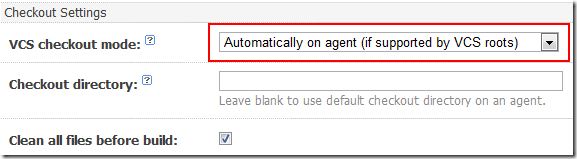
Well, after setting up a new VCS Root inside TeamCity the most important part is to set the VCS checkout mode to “Automatically on agent (if supported by VCS roots)”

image

Warning: Also make sure that you have git installed at C:\Program Files\git, because that is the only place git-teamcity will look for the bin (unless you change the code).

Second: Execute Powershell

Apparently there is some major bug with the ConsoleRunner inside TeamCity so all attempts to simply run the Powershell didn’t work. Directly invoking Powershell led to the build timing out. After some digging I found this thread that explained the problem and hinted at a possible solution: Touble with Powershell and NAnt during build

So, I created a .bat file called TeamCity.bat that calls Powershell directly from it’s full path (C:\Windows\System32\…) like this:

C:\WINDOWS\system32\windowspowershell\v1.0\Powershell.exe .\psake.ps1

But this doesn’t work due to the above bug in TeamCity. The build kept hanging and eventually got terminated due to an timeout. So I had to change it to something like this:

echo abc | C:\WINDOWS\system32\windowspowershell\v1.0\powershell.exe .\psake.ps1

Putting echo in front of it made it work, I have no idea why, but id worked.
Now the next problem came up: although I explicitly ran Set-Executionpolicy on the box the runner’s executionpolicy was not set. So I added the Set-Executionpolicy to the .bat file:

echo abc | C:\WINDOWS\system32\windowspowershell\v1.0\powershell.exe Set-ExecutionPolicy remotesigned
echo abc | C:\WINDOWS\system32\windowspowershell\v1.0\powershell.exe .\psake.ps1

Now, finally the script was executing, but due to no environment variables, my buildscript could not locate git (due to the ConsoleRunner not having ANY environment variables present).

The final version of my TeamCity.bat then included a change to the PATH variable and it finally worked:

Set "path=%path%;C:\Program Files\git\bin" 
echo abc | C:\WINDOWS\system32\windowspowershell\v1.0\powershell.exe Set-ExecutionPolicy remotesigned
echo abc | C:\WINDOWS\system32\windowspowershell\v1.0\powershell.exe .\psake.ps1

At that point the build was finally executing and I then only had to tell TeamCity where to find the build artifacts and I was done.

Conclusion

Now that it works, I’m glad I took the time to set it up. But the process could have gone smoother.
Anyway, the good news is:

You can now get a release version from every future commit to the dotless repository right from our dotless TeamCity server!

Read more →

Simplifying releases through git

I confess: I love writing build scripts. They are usually insanely easy to write, and provide you with a disproportional amount of value over time that it’s almost tragic not to have them. And, I love git.
So, what’s better than to see git simplifying my buildfiles :).

Imagine the usual: Your assembly version is encoded in your buildfile, so whenever you want to release you do the following:

  1. Increment version number in buildfile
  2. Run buildfile
  3. Create a tag in your SCM for the released version

Now, thanks to the smart people at the castle mailing list I found out about the git describe command. By using git-describe you can simplify the above to just:

    1. Create a tag in your SCM
    2. Run buildfile

The function for that is quite simple:

function Get-Git-Commit
{
    return git describe
}

function Get-Git-Version {     $v = git describe --abbrev=0     return $v -replace "v", "" }

Get-Git-Commit is returning the full name of the build, giving me a string like: v0.1.0.2-2-gd19ce0f.
And Get-Git-Version will output the tag-name without the leading v so it can be used as the product version inside the assembly info.


My buildscript then uses this version information from git to write my AssemblyInfo.cs files and build numbers have started to magically change!

This technique helps me to avoid all the hassle of incrementing build numbers, but instead allows me to focus on my work more. Once I feel the release is done, I simply hit:

git tag –a v1.0.0.1

(don’t forget to use git push –tags to get them to your server)

Hey, that’s awesome! There has to be a catch right? Indeed, there is:

If git is not installed, you can’t compile. Bummer I know, especially since the unwashed masses are in the process of slowly grasping the concept of SVN, who would want to throw a DVCS like git at them?
This is why all of my build script have a step called release that packs everything together in one nice zip file and I can then upload it to some server. In case someone has no git, he’s stuck with my binary files.

You can see this in action by looking at these open-source buildfiles I wrote lately: dotless, elms-connector.

Read more →