Custom ASP.NET Membership provider

I've been ranting too much lately, so I guess it's time to get back into coding.

This time around I've been challenged with a new project that involves a legacy database, while my task is to rewrite the ASP.NET application that runs ontop of that database without actually touching the database.

So first: What is ASP.NET Membership?

Simple answer: A great way to build authentication with little to zero coding effort with very cool draggy-droppy developer experience :). You simply drag a Login control to your ASP.NET page and your application just learned how to authenticate and keep the session of users.

To achieve this on a already existing database you simply need to do one thing:

Implement the abstract class MembershipProvider and implement just one method: ValidateUser

public override bool ValidateUser(string username, string password)
{
    if (username == "tigraine" && password == "tigraine")
        return true;
    return false;
}
You see where I'm going here, you basically just need to return true or false given a username and a password. How you do it is entirely up to you as long as you return either true or false.

To make the magic actually work you need to add the new MembershipProvider (i've called it DBMembershipProvider) to your root web.config:

<authentication mode="Forms">
	<forms loginUrl="Login.aspx"></forms>
</authentication>
<membership defaultProvider="DBMembershipProvider">
	<providers>
		<add name="DBMembershipProvider" type="DBMembershipProvider" />
	</providers>
</membership>
The <authentication mode="Forms"> is quite important because it tells asp.net to actually use forms driven authentication instead of windows authentication or microsoft passport. I also defined the loginUrl attribute to tell the app where to redirect anonymous users, but that's optional.

The membership stuff now is important, because here we glue the new provider into our system.

We just add a new provider in the <providers> section and name it conveniently, and most important: we tell .net what type to instantiate.

The defaultProvider property then tells .net what provider to use (if you've got multiple providers to log into your website, eg: Windows and Forms auth)

And, that's it. As long as the ValidateUser method returns true/false, your users can now use a fancy Login form to authenticate and their login session will get stored in a cookie. You can now drag LoginStatus and LoginName controls to your form and watch the goodness work :).

Hey! How do you actually secure something with this?

Yeah, I was so happy with that login working so I almost forgot to do this part. Usually you want to protect some files or directories from unregistered users. This also happens at the web.config level and is quite easy.

In case of a folder, just put a blank web.config in there and add the following directives:

<system.web>
	<authorization>
		<deny users="?"/>
	</authorization>
</system.web>
Now only registered users have access to this directory and you're done.

If you don't want to lock the whole directory but only some files in there you can do this through the verb attribute by either specifying a regex or a filename to be affected by your rule. (You could also use the <allow> tag to add exceptions to your deny tag I think)

Actually, if you look at the MembershipProvider, there's a ton more functionality I just skipped here. But this has been everything I needed to get login and user restriction for my current project, so I thought it's worth sharing how darn easy this actually is. If you want to delve deeper into the topic I'd suggest you either read 4GuyFromRolla or search through MSDN.
Read more →

Polluting Userspace

Once in a while I actually use the "My Documents" folder to retrieve files I've put there. Or worse, I sometimes store files there!
Gosh, impossible? Hell yes! Impossible due to the shitload of folders all sorts of software vendors think I need in MY user space! Who in the hell allowed ICQ to start storing received files in there? Do I really want that? Did they ask me?
Who actually decided that every damn game out there you install has the right to just go into your "My Documents" and place it's save games in there? If I open up my documents I get a almost 100% accurate view of what I've been playing over the last few months or so.

That's unacceptable! Sorry to say that, but I have 3 folders in there where I "dare" to put my data, while the total folder count in my "My Documents" is 19! So that's 16 folders I didn't create and I don't need in there.

But why did it get that bad?

The answer is simple: Because backup is painful.
Even an IT pro has a hard time collecting all those config files from the various C:\Program Files\config folders, imagine a home user going through those steps. So software vendors thought: Users may know how to back up their "My Documents" folder, if we put our stuff in there we're safe!

Guess what? They made the opposite true: Users simply don't use this folder any more, most people I know keep their data on locations like "D:\" or some other place where they can access them conveniently without seeing unwanted folders pop up.
And, I'm inclined to do the same. Screening through 16 unknown/irrelevant folders isn't something I want to be doing in a folder I thought was for my private use only!

But where to put those files?

By far the most convenient location for configuration files imo is the program directory where you've installed the application. But to be honest, I don't think the average end-user app should really need a config file. Most applications we currently use just work out of the box with very little need for configuration.

Secondly, there's still the AppData folder that's intended to hold application data, and by definition config files are application data. Why in the hell didn't they use this??
AppData is also located in the users's profile folder so it might get backed up.

PLEASE:

If you're writing software, either omit configuration files (best solution!) or keep them out of my user space and save them in a location that actually makes sense!

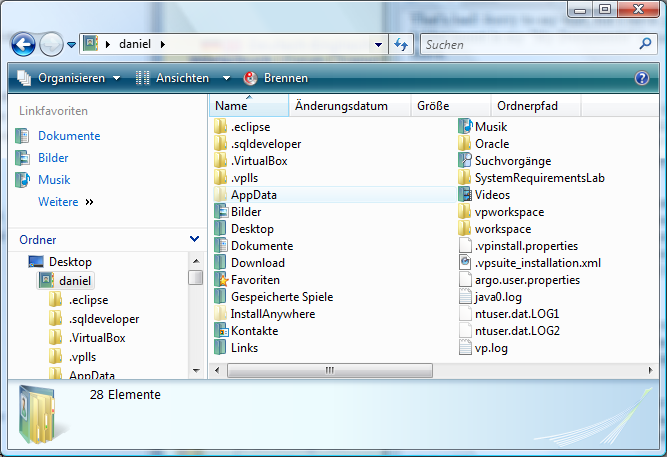
Oh, and by the way. With user space I don't mean only the "My Documents" folder. I really can't understand why some applications (namely eclipse, oracle, visual paradigm, virtual box) decided that it's ok to put them in my C:\users\<username>\ instead! That folder was intended to give me quick access to my Documents, Desktop, Favorites, Downloads, Images, Music, Videos. Not to scan through those .eclipse/.sqldeveloper etc etc folders. Please guys out there, understand that windows isn't hiding folders that start with a dot from the user! That's linux and we Windows users don't want those folders to be in the root of our profile!

image

Read more →

IT-Camp at Klagenfurt University

As Mathias has already hinted, today was the final presentation of the ongoing computer games implementation week I was instructing at klagenfurt university. During the last week I and Christian where working together with a small group of 7 high school students (of age 15-17) on some pretty amazing computer games with Microsoft's XNA framework.

We started out with some basic talk about computer games in general and introduced the students to Microsoft XNA on the second day. Most of them had some basic Java experience and absolutely no knowledge of C# or XNA. After pointing out some syntax differences between Java and C# we started with a very basic boulder game tutorial from the XNA creators club website that should teach 2D rectangle collision detection with XNA. Afterwards the students were asked to expand on this idea and create their own 2D computer game.

And now I am very happy to show some of their great work they did during the last 4 days!

This is where we started out:

And these are screen shots from our student's projects (click to get the full view):

Argon Abwechslungsreiche Einöde Block Fighters Space Impact Sweet Sattelites


I also promised Mathias to create videos from the projects that we did so he can show them at future computer games courses, I'll post these videos on YouTube once I've recorded them.
We will also be releasing the games source code, but I am still trying to figure out the license for some of them.

I've had a great time with those talented kids and hope they enjoyed learning as much as I did enjoy teaching!

Read more →

Skype security and multiple logins

When talking about Skype I usually mention that Skype is one of the few IM clients out there that has great encryption built into it. Due to it's peer to peer hybrid structure encrypting data while sending it through the p2p network is very important, and Skype has some pretty advanced encryption algorithms in use.

But, guess what?
You won't notice that somebody is spying on your Skype conversations if your Skype login information has been disclosed. :)

I noticed this after leaving my computer running while going to university today, and the IM conversation I had with Mathias was not only delivered to my laptop but also to my home computer. Completely unnoticeable (from the laptop) my home PC received the whole conversation, so a 2 way IM session could have been a 3 person chat session with only 2 nicknames. Weird isn't it?

This behavior is especially dangerous if you think about how most users pick and protect their passwords.

Read more →

Del.icio.us dissappears from the feed

After some thought I finally dragged myself to make a decision on the del.icio.us links in my RSS feed:

I finally decided to remove the links from the feed, most of my del.icio.us links aren't just that relevant to my blog posts that I really need to share them with you.
If you still want to recieve my del.icio.us links you can simply subscribe to my del.icio.us feed or add me to your network in del.icio.us.
Another way to stay informed on my del.icio.us (and all my other activities, wether you like it or not *gg*) would be to simply follow me on friendfeed (although I still haven't really grasped the concept of the site).

Hope the feed just got more enjoyable for you :)

Cheers!

Read more →

ASP.NET HttpModule that detects debug mode on production servers

So, after reading some stuff about HttpModules lately I thought it would be fun to create one myself. And, so I came up with something that might be useful in some scenarios.

A HttpModule that will cry foul when you try to put up a ASP.NET website with debug="true" onto a production server.
It is actually rather simple. Just a standard HttpModule that will check wether the request is local and wether debug is enabled. The local request check is done to make the module transparent to you while developing the app on cassini, while you'll see it instantly when you copy it over to your web server.

The code is rather simple:

public class DebugWarner : IHttpModule
{

    public void Dispose()     {    }

    public void Init(HttpApplication context)     {         context.BeginRequest += new EventHandler(context_BeginRequest);     }

    void context_BeginRequest(object sender, EventArgs e)     {         if (!HttpContext.Current.Request.IsLocal &&             HttpContext.Current.IsDebuggingEnabled)         {             HttpContext.Current.Response.Write(                 "<div style=\"background: #ea999d; border: 1px solid black; width: 500px; text-align: center;\">\n" +                 "<h1>Debug Mode is enabled!</h1><p>This severely impacts Webserver performance<br />" +                 "Set <compilation debug="false"> in your web.config</p>" +                 "</div>");         }     } }

Making this work is quite easy too, simply put the above class in your App_Code directory and add this line to your <httpModules> (or <modules> on IIS7) section:

<add name="DebugWarner" type="DebugWarner"/>

If you now try to access the page with debug="true" you'll get:

image

Read more →

Source Control, Open Source and Microsoft

Something hit me today when I went into the "Team Synchronization Perspective" in Eclipse/Subclipse while trying to merge some changes a colleague made with my repository:

Visual Studio 2008 doesn't sport ANY source control of ANY kind that's for free!

If this isn't true I'm eager to hear about it.
But I only know about Visual Studio Team System, and that's not free:

Typically, customers purchase an MSDN Premium subscription when licensing the Team Editions and Team Suite, which provides Software Assurance that entitles users to product updates over the life of the subscription. This includes Team Foundation Server Workgroup Edition, development licenses of many Microsoft Windows versions, Visual Foxpro 9, Visual Studio 2005 Tools for Microsoft Office, development licenses of many server-side offerings, SDKs and DDKs, a large amount of documentation, and more. The Team Edition and Team Suite products can not be purchased without an MSDN Premium subscription.

Last time I checked, MSDN Premium costs $2,499 and additional $1,999 every following year.

I also used Visual Source Safe before (VSS 2005), and it was a huge pain in the ass trying to work with it due to the "one-guy-check-out" policy it enforces. So if you need some field/method in another class to continue working on your class, you'll be running circles through the office trying to get others to check the file back in (resulting in half-broken check-ins etc).

So I wonder, with all that commitment Microsoft has been showing to supporting and promoting open source (CodePlex, CodeGallery), why in the hell do they keep all the tools that would support open source development away from their users? I think that even Visual Studio Express edition should at least come with decent support for source control inside the IDE that is actually able to connect to CodePlex! (There is a SVN bridge, a command line client and the suggestion to get the team edition of VS.).
So, bottom line my CodePlex source control experience has been "lacking", while I'm getting more and more fond of subversion combined with subclipse.

While I'm seeing subversion becoming more and more "standard" among open source projects (if not THE standard), I wonder why Microsoft is making it intentionally hard to work with Visual Studio on shared projects.

So, as I already hinted at in my post about ASP.NET Wiki, Microsoft seriously needs to get more consistent in their efforts. Either support OSS and developer collaboration, or don't. But don't try to do so badly. The way they try right now isn't really going anywhere.

Update: Btw, Eclipse just released a new version called ganymede that really rocks!

Update2: Apparently I didn't find this info last time I used Codeplex, but it looks like there is a way to integrate a Team System client into VS called Team Explore 2008. I'll be looking at this tomorrow.

Update3: Mark Phippard just pointed me at AnkhSVN for Visual Studio that seems to be a pretty decent SVN client integrated into Visual Studio. Thanks for this link.

Read more →

ClickOnce and Vista UAC

So far I've been using Windows Vista since day 1 it's been released here in Austria and I have been very pleased with the system. Imo Vista has a far worse reputation than it deserves. I really can't think of myself using XP any more .

Also I think that UAC is a very very good think in Windows Vista and really helps secure the computer against malicious programs. If you get over it popping up every 3 clicks while you set up the machine, in running state you hardly see the question any more (except for administrative tasks).
So, I never ever disabled UAC until now.

Why? Because ClickOnce is giving me a hard time.
ClickOnce is automagically working perfectly in XP because it just starts up IE and starts to bootstrap the program. But if the program requires admin rights you're out of luck in Windows Vista.

But, I've found a workaround for ClickOnce when you download the ClickOnce application.

Just start IE as administrator (right click -> run as administrator) and the ClickOnce bootstrapper will eventually use the running instance of IE that has elevated rights.

I haven't had a way to identify why this isn't working 100% of the time, but sometimes this doesn't work either, so your only way out is to temporally disable UAC. Here's how to do it:

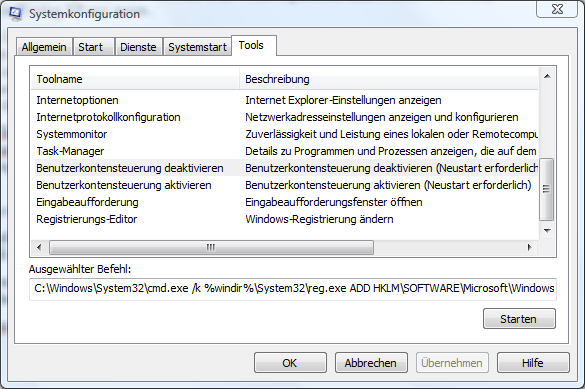
First you need to start msconfig through the run dialog (Windows-Key + R -> msconfig -> O)
Now you select the Tools tab and need to scroll down until you find disable User Account Control (or something similar, I'm running a German Windows).

image

Once you've found the line simply press "Launch" / "Starten" and reboot the machine. UAC will be disabled and you can run your ClickOnce application.

I strongly advise you to turn UAC back on once you're done, because running in admin mode compromises your computer's security!

Bottomline:  Try to avoid older ClickOnce applications (newly compiled ones don't have this problem) that require administrative rights to run.

Read more →

Don&apos;t bother with sharing a printer

HL-2140

If you've ever ran a home network before you may have noticed that installing and running a printer over the network usually works great and pretty seamless.

Except for those rare conditions where your printer drivers sucks, the host where you connect your printers is old and slow, and the fastest way to your printout is copying the doc to the host computer to print it locally.

I've complained about that before, but I didn't need too much printing lately so I forgot. Until today when I found the wonderful Brother HL-2150 N printer that costs just 130€ and sports its own NIC.
So instead of bothering with network share and stuff like that I just had to plug in the printer to the LAN and run the driver install locally at my machine.

Everything was up and running in about 30 seconds and I'm relieved of the ever daring "is this stupid computer up or not" question (The status LEDs on the host aren't connected).

If you need a cheap black and white network printer, I'd definitely suggest this one here.

Read more →

ASP.NET Wiki - An unpleasant experience

Last time (just before I went mad at Windows Live Writer), I posted some modified code from the ASP.NET Wiki that I thought isn't worth posting to the Wiki, while still being worth a post in this blog (it was out of scope for the Wiki article).

But what I also had to note that the Wiki System is far far away from perfect.
So let's get to the nitty gritty details at the example of the good article on HttpWebRequest.

Click the edit button and get a standard (really nothing special) WYSYWIG editor that completely hides the markup from you.
Maybe somebody sees this as a good thing (editing MediaWiki isn't that great after all due to WikiText), but I think WYSIWYG is absolutely lame!

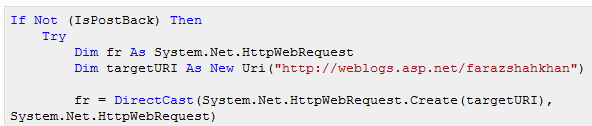
Let's get to the source. To get this look

image

The HTML code looks like this:

<div style="border: 1px dotted rgb(204, 204, 204); padding: 5px; background: rgb(239, 239, 239) none repeat scroll 0% 0%; -moz-background-clip: -moz-initial; -moz-background-origin: -moz-initial; -moz-background-inline-policy: -moz-initial; color: black; font-family: Courier New;">
<p style="margin: 0px;"><span style="color: blue;">If</span> <span style="color: blue;">Not</span> (IsPostBack) <span style="color: blue;">Then</span></p>

<p style="margin: 0px;">    <span style="color: blue;">Try</span></p>

<p style="margin: 0px;">        <span style="color: blue;">Dim</span> fr <span style="color: blue;">As</span> System.Net.HttpWebRequest</p>

<p style="margin: 0px;">        <span style="color: blue;">Dim</span> targetURI <span style="color: blue;">As</span> <span style="color: blue;">New</span> Uri(<span style="color: rgb(163, 21, 21);">"http://weblogs.asp.net/farazshahkhan"</span>)</p> </div>

I hope this has just raised some eyebrows, it sure did when I saw it first. Hell that's the way Microsoft wants us to post code??

After all, ASP.NET is about code. It's about ASP.NET, so there will be code everywhere. And we're supposed to somehow (still don't know how) do the syntax highlighting manually, copy everything to the HTML surface in the shitty WYSYWIG editor and then let others come in and edit this crap?

Oh my god, man.. Wiki is all about editing, not about posting in the first place. If I want to write a new story on something I'd go off and post it to this blog.
But to edit just one line of code, you'd have to copy the whole code sample into some kind of IDE, edit it, export it in HTML, repost it to the Wiki's HTML view.

No way anyone would ever go through this hassle just to increase the readability of some sample. I mean, if I'm in for a 20 minute edit job just because I think the variable int x should be named double y_, I'd never even think about editing.

So, concluding: Sorry Microsoft, but try harder next time.
Posting Code to a Wiki about code should be as seamless as possible, and not providing the tools to do so is a shame!


There is a "Format option" called "Source code" in the WYSYWIG, but it doesn't do a damn thing, so we see people posting their code from Word (like in the CSVExport article), do some other weird stuff (look above!).

Get your act together Microsoft, create a <code> block that will get syntax-highlighted at the server or something like that. But don't depend on your users to put even more effort into their contributions!

Read more →