How to ruin my day

In case you are somewhere stuck in a plan on how to make my day miserable I’ve got a tip for you:

Write absolutely horrible code like this and leave the maintenance to me:

Method signature:

internal void TryRequestSession(string securityToken, ref Guid secID)

Call site:

public ActionMethod Open(string securityToken)
{
	Guid secID = Guid.Empty;
	try
	{
		secID = new Guid(securityToken);
	}
	catch
	{}
	Guid oldSecID = secID;
	provider.TryRequestSession(securityToken, ref secID);
	if (oldSecID == Guid.Empty)
	//....
}

There are many things wrong with this code, but I’ll spare you the details and say that new Guid(securityToken) will always throw a ArgumentException and that I have absolutely no tolerance for void methods that have ref parameters!


Whatever was going on in that chimps mind who wrote that, it couldn’t have anything to do with programming.

So, recap: If you expect other people to maintain your code (I’m currently rewriting this thing, it’s easier) make sure you do the following:

  1. Have Unit tests that specify the behavior
  2. Leave an actual spec that can be looked at
  3. NEVER use ref if you can use return
  4. Don’t swallow exceptions (and if you have to, leave a comment!)
  5. Make it run!

Yes that’s right. If you leave a piece of crap behind, at least make it compile! I had to search for 3 totally outdated libraries to even make this piece of junk compile on my machine. Again: The GAC is your enemy!

Thank you, you now may go on with your lives while I feel a lot better and my actually start enjoying my coffee :)

Read more →

Using a Mac Keyboard on Windows

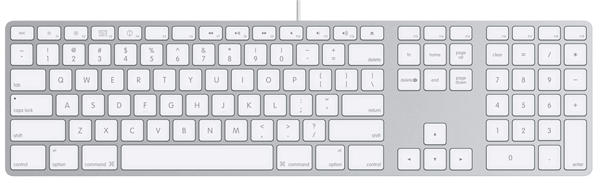
I decided to do something really stupid: Spend 50€ on a Apple Keyboard.

image

Why? I was in the market for a keyboard that mirrors my laptop’s key press experience. The Apple Keyboard seemed like the perfect choice at first, and so I bought it at my local Apple retailer.

One thing I didn’t consider at the store was that on the Apple Keyboard ALT and Command have traded places, and the default mapping on Windows is Command = Winkey.

So, I found some handy guides on the internet on how to use the nice little program AutoHotkey to remap keys on the keyboard. So I could flip positions on Winkey and Alt.

Doing so with AutoHotkey is very easy and there are numerous scripts out there to do all sorts of crazy things. Here is the script I came up with after some time:

LWin::LAlt
LAlt::LWin
RWin::RAlt
RAlt::AppsKey
+F8::Send {Media_Play_Pause}
+F7::Send {Media_Prev}
+F9::Send {Media_Next}
+F10::Send {Volume_Mute}
+F11::Send {Volume_Down 2}
+F12::Send {Volume_Up 2}
F13::Insert
F14::PrintScreen

Also I have found it important to run AutoHotKey as admin, otherwise all these key mappings are lost whenever you enter a UAC protected area.

Now that the Key mappings are all set up I have to say that I am really happy with the keyboard so far. The typing experience takes some time getting used to, but it’s really solid and well manufactured and I am not really all that sure if I’ll go back to my Natural Keyboard 4000 anytime soon. (I might if the Apple one proves to be discomforting after prolonged use, but that remains to be seen).

PS: Windows Live Writer on my main machine decided to break. As of now I can’t write blog posts on my computer any more and I have on explanation for that (besides some Exception text stating that Courier New has no regular cut). And I get really pissed off by that (and by the fact that WLW is saving my drafts in some obscure binary format I can’t read).

Read more →

imagineClub Website source has moved to GitHub

I have been using Mercurial as my SCM of choice for quite some time now, and I’ve been loving it ever since. Working with a DVCS is a pleasure compared to the slow and painful experience I see when using Subversion. Not that Subversion is a bad product, but my workflow is just totally different from what SVN was built for.

Having used git now a bit while helping Erik on the Less.Net project, I discovered that it feels a tad better workflow wise. I especially like it’s much better branching support and it’s support for shelving changes. Both things already in hg, but not as easy to use or only available through addons.

Another thing that made the switch tempting was the fact that it seems almost the whole .NET community decided to head over to GitHub to continue development. There are NHibernate forks, there are Castle forks etc etc.. Even Ayende moved there!

So I decided to follow the herd, being familiar with the tools the community uses is very important to me, so today I finally moved the imagineClub website source to GitHub.

Why finally? Well, I’ve been trying to for now 2 days and simply failed. Today i finally decided that it’s OK for me to loose all my history and to start a fresh repo with the existing code. The migration from hg to git seems to be so uncommon that there is a significant lack of tools for that.

There is the hg2git from the GitHub crew, that didn’t work for me. And there is a hg2git script inside fast-export that I couldn’t run on Windows. Although Zerok managed to convert it on his Mac machine, all the linefeeds were wrong and therefore the history was rendered useless. So I decided to quit trying and simply wipe the history, start from scratch and be done with it.

So, now the new home of the imagineClub source is located here:
http://github.com/Tigraine/ic-website/tree/master

Feel free to watch / fork the repo.

Read more →

The paging antipattern

Wherever you look on the internet, everywhere you’ll see pagination. This is especially important in web shop scenarios where you don’t want to overwhelm your user.

Usually you just take these things for granted and use them to navigate around, until you discover a gem of bad design like this one on the German bookstore Thalia:

image

This is a 1:1 screenshot, no scaling from the original. And as usual: the one < will take you to the previous page, the << will take you to the very first page.

Now, let’s consider these options that are only 3 pixels apart from each other: First page, previous (thus page 4), page 1.
Let’s just assume that unless you are really careful with you mouse you’re looking at a 2/3 chance of finding yourself on page number 1 instead of 4!

Instead of trying to home in on that tiny next button I found myself using the numbers to get to the next page, totally ridiculous.

Upon getting frustrated by this particular eBook store I decided to take a look at the other major players and their pagination solutions.

Amazon:

image

I just measured a distance of over 40 pixels between the 3 and the Next button. And even on a search where with less than 3 pages they keep a distance of at least 20 pixels between Next and 3. Also important that Next is always last and Previous is first. No First and Last button anywhere to be found.

Google:

image

Again, hitboxes for Previous and Next are enormous while completely lacking First and Last.

Ebay:

image

Bing:

image


Conclusion: Nobody uses these  Last and First any more. Get over it and leave them out! Why should anyone want to go to the last page of a listing that is probably already sorted by relevancy?

Instead use the space for huge Previous and Next buttons that are far away from any other navigational controls. At any rate, never ever use those <> Symbols alone as you means to navigate, always provide a big enough hitbox to avoid frustration.

Read more →

Using ActiveRecord&rsquo;s Field mapping to map custom enumeration classes

One thing that may be overlooked sometimes (I certainly did) is the ability of ActiveRecord to not only bind to properties but also to instance fields (yes, even private ones). This little feature came in very handy when I was looking for a way to persist a class based enumeration. I’ll tell you why in a minute.

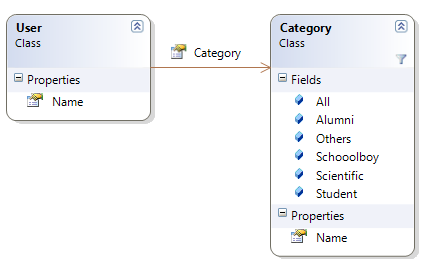
First, I have Users that can be in one of 5 categories. None of which were important enough to warrant a foreign-key relationship modeling in the database, but I still wanted to encapsulate them in some sort of object to avoid doing string checking inside my code. The model looks like this:

image

I clearly didn’t want to have a Category table in my database, so I decided on creating the Category class while saving the Name property to the database.

Here is my implementation of the User.Category field:

[Field]
private string category;

public Category Category {     get { return Category.GetCategoryByName(category); }     set { category = value.Name; } }

As you can clearly see. My code is only dealing with Category objects (that can have implementations attached) while behind the scenes I only write the name of the category to the backing field. This way I get rid of magic strings inside my code while not having to burden my database with foreign key constraints.

Read more →

I&rsquo;m in love with Android

Last year I bought myself a iPhone 2G through friend from the US and was very fond of it, mainly because I didn’t have a Smartphone before. But as time goes by, the limitations of the iPhone platform became more and more obvious.

I made the decision not to buy a newer generation iPhone when I was at the office one evening and needed to carry a large db dump file with me home. Imagine my feelings when carrying a 16GB iPhone that has about 13GB of free space available and not being able to use it as a thumb drive due to it’s lack of a mass storage mode. Luckily I had my DSLR with me so I formatted my 8GB SD card and used that instead. But not being able to place files on a phone is just plain stupid.

Also I’m just tired of iTunes and it’s totally retarded syncing model.
I’m a totally connected person, all my data is in the cloud, be it code (BitBucket, GitHub), email (Gmail), calendar (Google calendar), Google reader or contacts (Gmail). So having to plug my phone into the computer at regular intervals to update information on it is just not the way I wanted it to be. (Especially considering what a headache it is getting data synced between Outlook and Google’s services).

So going to a Android phone was a pretty logical decision for me. I can take all of my current data with me, use the wireless syncing capabilities that come with using Google’s Gmail and Calendar services, and be up and running in less than 5 minutes.

Actually, it only took about 3 minutes for Google to load all of my contact list into the phone and present me with a fully working environment of Contacts, Email and Calendar. And that’s really impressive.

And lastly, I’m a developer! Being able to develop for my own device is very important to me, and not owning a Mac and hating the idea of programming in objective C (believe me I tried) severely limited my ability to do that on the iPhone platform.
Android on the other hand is using Java (not perfect, but still way better than C) and is not constrained to a particular platform with their SDK.

Although the platform choice was easy, the phone one was hard. As of speaking there are only 3 serious Android handsets in the market: HTC Magic, HTC Hero and Samsung Galaxy.
And to be honest: None of the three is perfect. The Magic has no headphone jack, the Hero is very bulky and due to sense UI not always as Snappy as I’d like it to be and the Galaxy didn’t bring any interesting features besides the AMOLED display. 
Since none of the current devices is really perfect, I figured buying the cheapest one and letting the platform mature for another year would be the best course of action. So I bought the HTC Magic.

So far, I’ve been using my Magic for about two weeks and love it. It’s fast, having multi-tasking paired with push notification for almost everything from Google makes this phone simply a joy to use. I get email notifications faster on my phone than I get them through the GMail notifier on my PC. I can use Google Talk to chat with friends who use Android instead of writing SMS or look up their position through Latitude.
Also the battery life on my Magic is way better than it was on my iPhone. While I was lucky to get my iPhone through one day without plugging it in, my Magic can easily live through 2 with push services and background tasks enabled.

The Android Market is also filled with lots and lots of apps, so there is no real disadvantage from the iPhone here. I even came to appreciate the ability to scan barcodes on the phone while shopping!

Now, from my limited testing so far I found the following apps really nice and handy:

  1. twidroid (Twitter .. )
  2. Places Dictionary (Gives you POI near you)
  3. My Tracks (Running track recorder)
  4. NewsRob (Very good Google Reader app)
  5. Astrid Task/Todo List
  6. Wikitude World Browser (cool augmented reality from Austria)
  7. Google Maps (make sure to get the newest version manually from the Market)
  8. Battery Widget (from mipping.com)
  9. Barcode Scanner (also scans QR codes)
  10. Quickpedia (Wikipedia app)
  11. Google Sky Map (oh this is so awesome!)

But what I love most about the phone is simply it’s syncing! I edit all my contacts online through GMail and without even thinking about it they all get updated on my phone too. No hassle with plugging it in or anything, totally zero friction. It just works!

My only gripe with the thing so far: You can have only one input language for the keyboard selected at a time. Since I frequently use the phone to look through twitter or emails, I sometimes need to switch from German to English. The iPhone had that handy little button to switch, while the Android would require me to go through the phone’s settings.

Verdict: I’d never go back to my iPhone. Although the platform is still young and there are some rough edges to be worked out, I feel like Android will be a serious player during the next years.
Read more →

Howto get rid of *.onetoc2 files using Powershell

Today I did one small mistake when trying to open a command-line window on my source folder: Instead of hitting “Open command window here” I accidentally clicked “Open as OneNote notebook”.

Quite innocently, OneNote opened, I closed it. Everything was fine. Until I did a hg status:

? lib\OneNote Inhaltsverzeichnis.onetoc2
? lib\castle\OneNote Inhaltsverzeichnis.onetoc2
? lib\elmah\OneNote Inhaltsverzeichnis.onetoc2
? lib\nant\OneNote Inhaltsverzeichnis.onetoc2
? lib\nant\extensions\OneNote Inhaltsverzeichnis.onetoc2
? lib\nant\extensions\common\2.0\OneNote Inhaltsverzeichnis.onetoc2
? lib\nant\extensions\common\OneNote Inhaltsverzeichnis.onetoc2
? lib\nant\lib\OneNote Inhaltsverzeichnis.onetoc2
? lib\nant\lib\common\OneNote Inhaltsverzeichnis.onetoc2
? lib\nant\lib\common\neutral\OneNote Inhaltsverzeichnis.onetoc2
? lib\nant\lib\mono\1.0\OneNote Inhaltsverzeichnis.onetoc2
? lib\nant\lib\mono\2.0\OneNote Inhaltsverzeichnis.onetoc2
? lib\nant\lib\mono\OneNote Inhaltsverzeichnis.onetoc2
? lib\nant\lib\net\1.0\OneNote Inhaltsverzeichnis.onetoc2
? lib\nant\lib\net\1.1\OneNote Inhaltsverzeichnis.onetoc2
? lib\nant\lib\net\2.0\OneNote Inhaltsverzeichnis.onetoc2
? lib\nant\lib\net\OneNote Inhaltsverzeichnis.onetoc2
? lib\nant\schema\OneNote Inhaltsverzeichnis.onetoc2
? lib\sqllite\OneNote Inhaltsverzeichnis.onetoc2
? lib\xunit\OneNote Inhaltsverzeichnis.onetoc2

Oh snap! OneNote just placed a table of contents file in every subdirectory of my lib folder! And, best of all, despite the setting “show all hidden” I couldn’t see those files through my explorer.
Also, a del /s *.onetoc2 did not remove the files.

Google to the rescue, I’m not the first to make that mistake, and Richard Siddaway also posted a way how to remove those using Powershell:

Get-ChildItem -Filter "*.onetoc2" -Force -Recurse | Remove-Item –Force

I’m quite shocked. I’ve been using the regular windows command line for quite some time now, and I have to say: Microsoft really has something going here with Powershell. It works really nice, and once you get a hang of the syntax it is really cool to work with.

Read more →

NDC 2009 Videos online

The Norwegian Developer Conference is over for quite some time now, and by looking at their speaker line-up it’s quite clear that I would have loved to be there.

Good for me that they videotaped all talks and decided to share them with the general public.

So, if you are interested in seeing Ayende, Michael Feathers, Scott Hanselman, Jeremy D. Miller, Phil Haack or Udi Dahan doing their talks, you can either stream them online, or you can go ahead and download a 30GB torrent with all of their talks.

The videos are online on the official conference page, or if you prefer a per-speaker listing:
Mark Nijhof has a list of all NDC videos for your streaming pleasure and Rune Grothaug has the torrent.

(Please keep seeding the torrent for a bit after your download has finished)

Read more →

Win7 shortcoming: Notetaking widget

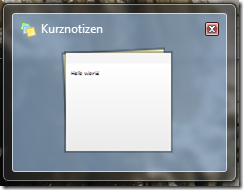
image

Oh, I love Win7. I said so after installing the first beta for the first time and I’ve been running my new favorite OS ever since.

But I have one problem with the way Microsoft used their built-in applications to showcase new functionality like jump-lists etc: They broke the Notes widget from the Windows sidebar.

You know, that little widget thingy that allowed you to write down 4 short lines somewhere on your screen.

In Windows Vista it was visible whenever your sidebar was visible (not a perfect solution either), but at least it was visible occasionally.

Windows7 changed this, Notes is now it’s own little application that has to run and that takes away space from my task-bar. And: When I use Aero-Peek to look at my desktop widgets, the Notes app turns transparent too.

So, it became nearly useless, since I want my notes to be a gentle, sometimes visible reminder for things I need to keep track of. Nothing I’d start a program to look at, no – something that is just there sometimes. And the new Win7 implementation of that falls seriously short of that goal. (And I very rarely see my desktop except for Win+D or Aero-Peek – both witch also remove the notes from the screen.)

In fact: I wonder why anyone would sacrifice some valuable taskbar real-estate for such a useless application.

Read more →